
If you're running Google Ads for tour operators or Meta Ads there's a very high probability that your conversion data is wrong. Not slightly off, but missing a material share of booking attribution, and the size of the gap depends on your audience's device mix and browser preferences. The mechanisms are documented: Safari caps the cookies browser tracking relies on at seven days, ad blockers stop the tags firing, and the checkout completes on the booking platform's domain rather than yours.
This isn't a configuration error you can fix. It's a structural problem built into how FareHarbor's Lightframe, Peek Pro's booking widget, Rezdy's iframe, and every other major booking platform handles checkout.
One distinction matters here, because the fixes are different. A booking platform’s <a href="/fareharbor-conversion-tracking/">GA4 integration</a> fixes the cross-domain handoff: it stops the booking being attributed to fareharbor.com instead of your site. It does not fix what GA4 itself misses: consent-blocked sessions, iOS tracking prevention, and bookings that complete outside the browser session. Server-side booking tracking is what closes that second gap. Most operators need both.
In this article I will explain exactly what's happening, why it matters, and how the problem is solved via server-side tracking (don't worry I will explain what this means throughout the article).
- The two-minute reconciliation test
- What is the FareHarbor conversion tracking problem?
- Does every booking platform have the same problem?
- Why does iOS kill so many booking conversions?
- Ad blockers and consent banners
- Every major booking platform compared
- Platform-by-platform detail
- FareHarbor vs Bókun vs Peek Pro: tracking at a glance
- How much conversion data are tour operators actually losing?
- What is server-side tracking and how does it fix the problem?
- Google Consent Mode v2
- Why sending booking values changes everything
- What does a tracking audit look like?
- Will FareHarbor or Peek Pro fix this automatically?
- How inaccurate tracking costs you money day to day
- Common mistakes that quietly drain your budget
- Frequently asked questions
The two-minute reconciliation test: is your tracking lying to you?
Step one. Log into your booking system — FareHarbor, Bókun, Rezdy, Peek Pro, Checkfront, Xola, whichever you use. Pull the total number of confirmed, paid bookings for last month. Only count bookings that came through your website (not phone bookings, not walk-ups, not OTA bookings from Viator or GetYourGuide). Write that number down.
Step two. Log into Google Ads (or ask your agency to pull this). Look at the total conversions reported for last month, for the campaigns that drive traffic to your website. Write that number down.
Now compare them.
If Google's number is within about 10–15% of your booking system's number, your tracking is in reasonable shape. If Google's number is 25% or more below your booking system's number, you have a significant tracking gap — confirmed bookings are happening, but Google never finds out about them. If Google's number is higher than your booking system's number, you are probably tracking button clicks instead of actual bookings — which is an even bigger problem.
Run the same comparison by value, not just count. If your booking system says you earned £30,000 in website-driven revenue but Google Ads reports £45,000 in conversion value, something is double-counting. Numbers that look too good are as dangerous as numbers that look too low.
Do this monthly. A sudden divergence usually means something broke — a pixel removed in a site update, a webhook that silently failed, a consent banner that started blocking a tag. Catching it in week one instead of quarter three is the difference between a quick fix and a season of wasted budget.
Most tour operators who run this comparison for the first time find a gap large enough to change which campaigns look profitable. Run it before you trust any platform's reported cost per booking.
What is the FareHarbor conversion tracking problem?
This means the standard Google Ads or Meta pixel tag on your website never fires on a completed booking. The conversion event lives inside an environment your tracking scripts can't reach through normal means.
FareHarbor's workaround is to add pixels directly to the FareHarbor Dashboard — meaning Google and Meta receive the signal from FareHarbor's servers, inside an iframe, after the booking completes. This works for desktop Chrome in a clean session. It doesn't work reliably in several common scenarios that represent a significant portion of your actual booking traffic.
Does every booking platform have the same problem?
Peek Pro's booking widget operates on the same principle as FareHarbor's Lightframe: the checkout runs on Peek Pro's domain, embedded into your website as an iframe or redirect flow. Peek Pro offers a tracking configuration panel under Configuration > Analytics, but the fundamental problem is identical.
Rezdy's own support documentation explicitly confirms the issue. Their booking form uses an iframe, and Rezdy states that Apple's cross-site tracking prevention impairs cookie persistence within their iframe. They even note that Google's standard cross-domain tracking solution (the auto-linker plugin) does not work with their widget.
Bókun's embedded and hosted checkout runs on bokun.io. TrekkSoft routes checkout through its own domain via modal popup, iframe, or new tab. Checkfront, Xola, Ventrata, and Regiondo follow the same pattern.
And there is a worse failure mode. Most operators, knowingly or not, work around the tracking gap by counting the "Book Now" button click as the conversion event. A button click is not a booking. Plenty of people click and then leave. If you tell Google Ads that every button click is a "conversion," Google's algorithm goes and finds you more people who click buttons and leave. Your reported conversion numbers go up while your actual bookings stay flat.
Why does iOS kill so many booking conversions?
For your tour business, the consequence is this: Safari on iPhone and iPad actively blocks third-party cookies. When your traveller loads FareHarbor's Lightframe or Rezdy's iframe inside your website, Safari sees the booking platform's domain as a third-party relative to your website. It blocks the cookies and tracking scripts that the platform uses to pass conversion data.
But ITP does more than block third-party cookies. It also caps first-party cookies set via JavaScript — the kind your Meta Pixel and Google tag create — to a maximum lifespan of just seven days. If a visitor arrived through a link with tracking parameters (like the ?gclid= that Google Ads appends, or ?fbclid= from Meta), Safari cuts that cookie's lifespan to just 24 hours.
Industry data from FareHarbor's 2025 trends report shows that 50% of tour and activity bookings happen within 72 hours of first research, but the other half involves a longer consideration window — often 7 to 45 days depending on trip complexity. A traveller who clicks your Google Ad on Monday, browses your site, and returns to book eight days later registers as a brand-new visitor. Your ad gets zero credit.
Safari and Safari-based browsers (every browser on iPhone and iPad uses the same WebKit engine) account for roughly 18% of global web traffic across all devices. On mobile, Safari holds around 25% of global sessions — but in the US, where iPhone market share is highest, Safari accounts for approximately 45–50% of mobile browser traffic. In the UK and Australia, the figure is similarly elevated. These are exactly the markets most tour operators target.
Ad blockers and consent banners
Ad blockers. Global ad blocker usage sits at approximately 30–33% of internet users as of 2025–2026, according to data from GWI and Backlinko. Ad blockers don't just block ads — they also block the tracking scripts that report your conversions back to Google and Meta. The customer still books. Your ad platform just never hears about it. Ad blocker usage among tech-savvy travellers — a disproportionately likely demographic for independent tour operators — runs even higher.
Consent mode and cookie banners. Under UK GDPR, your website has to ask visitors for permission before tracking them. A declined consent does not mean a booking didn't happen — but if your consent setup isn't correctly integrated with Google Consent Mode v2, that booking becomes invisible to your ad platforms.
Every major booking platform compared
| Platform | Checkout location | Can this be fixed? | Fees to account for | Worth knowing |
|---|---|---|---|---|
| FareHarborBooking Holdings | Lightframe iframe (fareharbor.com) | ✅ Yes | ~6% booking fee (varies) | Confirmation is cross-domain — your site pixel never fires. Deduct fee before reporting value. |
| BókunTripAdvisor / Viator | Widget / hosted (bokun.io) | ✅ Yes | $49/mo + 1–1.5% fee | Filter out Viator/TripAdvisor bookings — only report direct website bookings to ad platforms. |
| RezdyRezdy Group | Iframe widget or hosted page | ✅ Yes | $49+/mo + 2% OTA (0% direct) | Rezdy's own docs confirm Safari breaks their iframe tracking. GA4 auto-linker doesn't work. |
| Peek ProPeek Travel | Hosted booking flow | ⚠️ Partial | ~6% booking fee | GTM integration is client-side only — still blocked by Safari and ad blockers. |
| CheckfrontRezdy Group | Embedded widget or hosted page | ✅ Yes | $99/mo + 3% booking fee | Post-merger with Rezdy. Deduct 3% if you absorb the fee. |
| XolaIndependent | Embedded checkout widget | ✅ Yes | 3–6% (charged to customer) | Fee is passed to customer — booking value ≈ your actual revenue. |
| VentrataIndependent | Embedded widget or hosted checkout | ✅ Yes | Custom enterprise pricing | Enterprise platform with well-documented OCTO API. Auto-retry if data delivery fails. |
| TrekkSoftIndependent (UK) | Modal popup, iframe, or new tab | ⚠️ Partial | $150/mo + 2.5% fee | Full API access only on Accelerate plan. Lower plans limited to Zapier. |
| RegiondoRezdy Group | Embedded widget | ⚠️ Partial | Custom pricing | Post-merger — systems being consolidated. Check current status with support. |
✅ Yes = straightforward to implement · ⚠️ Partial = possible but requires a workaround or a higher-tier plan. Fees vary by region and contract. Last verified June 2026.
The takeaway: the platform you use barely changes the size of the problem. What matters is whether the booking confirmation is captured server-side and sent directly to Google and Meta — the only approach that survives iOS restrictions and ad blockers across all nine platforms.
Platform-by-platform: where your tracking breaks
FareHarbor (Booking Holdings)
FareHarbor's checkout opens inside a lightbox iframe hosted on fareharbor.com. Your website's tracking tools cannot see anything that happens inside it. FareHarbor allows you to add pixels inside their dashboard, but those still rely on the customer's browser and are blocked by Safari and ad blockers.
How the fix works: FareHarbor's External API includes booking notifications that fire automatically when a booking is created, updated, or cancelled. Each notification includes the booking ID, customer details, item information, and payment data — everything needed to report the conversion to Google and Meta directly from a server.
Bókun (TripAdvisor / Viator)
Bókun's checkout runs on its own domain, whether you use the embedded widget or the hosted checkout page. Tracking scripts you add inside Bókun's settings are still browser-based, so they are still subject to Safari ITP and ad blockers.
How the fix works: Bókun's API includes booking notifications that fire on confirmed/paid status. The data is sent directly from Bókun to your tracking server.
Rezdy (Rezdy Group)
Rezdy uses an iframe widget for its booking form. Rezdy's own support documentation confirms that Apple's ITP impairs cross-site cookie persistence within their iframe. Google's auto-linker plugin does not work within Rezdy's iframe — their docs state that a "more advanced solution" with custom JavaScript is required.
How the fix works: Rezdy's Order notifications fire when a confirmed, paid order is completed. The API provides order-level data keyed on a unique order ID.
Peek Pro (Peek Travel)
Peek Pro uses its own hosted booking flow and has introduced a Google Tag Manager integration. This is a step forward, but it remains browser-based tracking — still subject to ad blockers, Safari ITP, and consent restrictions.
How the fix works: Peek Pro connects with Zapier, which can forward confirmed booking data server-side. For more robust implementations, Peek Pro's API can capture confirmed bookings and route them to your tracking server.
Checkfront (Rezdy Group)
Checkfront uses embedded booking widgets or hosted checkout pages. Following its merger with Rezdy and Regiondo, the platform offers broader features but the same core tracking limitation.
Xola (Independent)
Xola embeds its checkout as a widget on your site. Like FareHarbor, there is no monthly fee — but booking fees of 3–6% are charged to the customer.
Ventrata (Independent — enterprise)
Ventrata is an enterprise ticketing platform built for high-volume attractions and tour operators. It uses embedded widgets or hosted checkout pages.
How the fix works: Ventrata has robust notification support via the OCTO API standard. Booking notifications fire on confirmation, update, rescheduling, or cancellation. Their system includes automatic retry if delivery fails.
TrekkSoft (Independent — UK-based)
TrekkSoft offers modal popup, iframe, or new-tab checkout options. All three route the checkout through TrekkSoft's own domain, creating the same tracking blind spot.
Regiondo (Rezdy Group)
Regiondo merged with Rezdy and Checkfront in 2023. The platform uses embedded booking widgets with the same tracking limitations.
FareHarbor vs Bókun vs Peek Pro: tracking at a glance
The platform detail above boils down to one pattern — checkout completes on the platform’s own domain and whatever native tracking exists is still browser-based — so here is each platform’s break point and fix, side by side.
| Tracking factor | FareHarbor | Bókun | Peek Pro |
|---|---|---|---|
| Where checkout happens | Inside the Lightframe — a lightbox iframe hosted on fareharbor.com, not your site | On bokun.io, whether you use the embedded widget or the hosted checkout page | Peek Pro’s own hosted booking flow, embedded as an iframe or redirect |
| Main tracking failure mode | No conversion data can pass back from the Lightframe — your site’s pixel never fires on a completed booking | Scripts added in Bókun’s settings are still browser-based — subject to Safari ITP and ad blockers | The GTM integration is client-side only — blocked by Safari ITP, ad blockers and consent restrictions |
| What the native integration covers | Pixels added in the FareHarbor Dashboard (reliable on desktop Chrome in a clean session) plus a GA4 integration via the Measurement Protocol. No native Meta CAPI | Bókun’s own analytics integrations and tracking scripts added in its settings. No native Meta CAPI | A tracking panel under Configuration > Analytics for GTM and pixel tags, plus server-to-server GA4 options. No native Meta CAPI |
| What still needs fixing | Capture booking notifications from FareHarbor’s External API server-side — and deduct the ~6% booking fee before reporting value | Send confirmed/paid booking notifications from Bókun’s API server-side — and filter out Viator/TripAdvisor OTA bookings first | Forward confirmed bookings server-side via Zapier or the Peek Pro API — don’t rely on GTM as the primary conversion signal |
How much conversion data are tour operators actually losing?
That figure compounds across several sources of loss:
iOS/Safari ITP blocking: Safari's cross-domain iframe restriction systematically removes a predictable percentage of bookings from any device running iOS or macOS Safari. Safari caps JavaScript-set cookies at 7 days and cuts them to 24 hours when tracking parameters are present in the URL. For travel businesses with a high mobile booking rate or a UK/US/Australian audience, this is the largest single source.
Ad blockers: Browser extensions like uBlock Origin and Ghostery, and privacy-focused browsers like Brave and Firefox, block advertising pixels entirely. Global usage sits at approximately 30–33% of internet users. In Germany, the figure approaches 49%.
Consent mode and cookie banners: GDPR-compliant consent management, if not implemented correctly with Google Consent Mode v2, can block conversion tags for users who decline analytics cookies. A declined consent does not mean a booking didn't happen.
The optimisation problem this creates: Google's Smart Bidding and Meta's delivery algorithm both optimise toward the conversions they can see. If your tracking only captures 65 percent of actual bookings, your campaigns are training on incomplete data. A campaign that appears to deliver £45 cost per booking may actually deliver £29 once recovered data is in the picture. Or it may be £60. Without complete data, you cannot know which.
What is server-side tracking and how does it fix the problem?
This matters for tour operators in two specific ways:
Meta Conversions API (CAPI): Rather than relying solely on the Meta Pixel in the browser, CAPI sends purchase events from the server after a confirmed booking. It bypasses ad blockers and iOS cookie restrictions entirely, because the signal never travels through the user's browser. Meta matches the event to a user via hashed customer data (email, phone, name) rather than browser cookies. The result: Event Match Quality scores climb from the typical 3–5 range (pixel-only) to 7–9 (server-side with customer data), which directly improves targeting and attribution accuracy.
Google Ads Enhanced Conversions: Server-side enhanced conversions send hashed first-party data (email address from the booking confirmation) to Google's API, allowing Google to match the conversion to a logged-in Google user even when browser tracking failed. For tour operators, the fully server-side path (Enhanced Conversions for Leads / Offline Conversion Import) is the correct approach — it does not depend on the browser at all.
Server-side tracking is a direct phone call from your booking system to Google Ads and Meta. No intermediaries. No one can block the line. The booking happened, the call is made, and the ad platforms hear about it immediately — with the real booking value, linked to the right ad click.
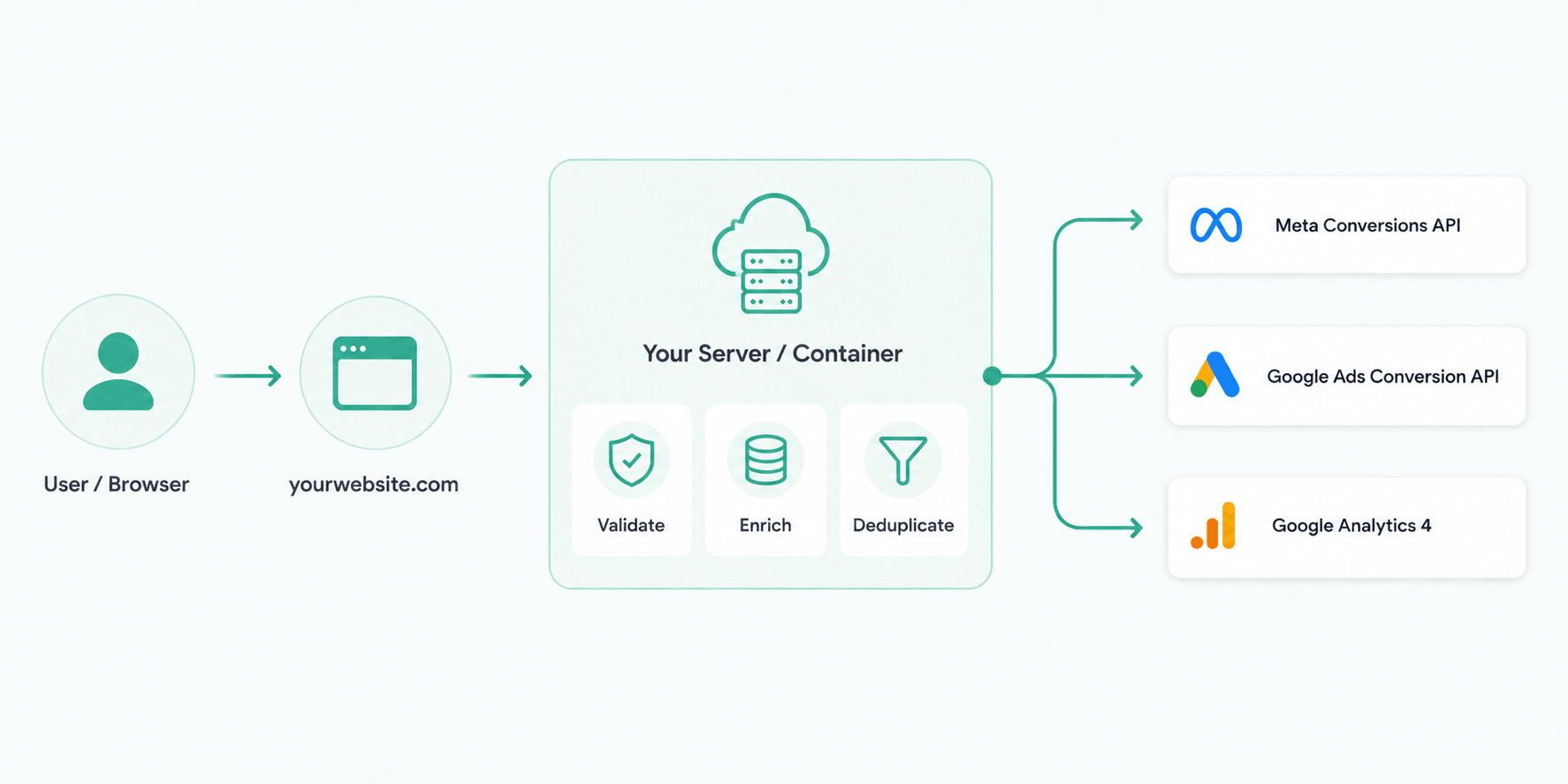
Deduplication is critical. When both a browser pixel and server-side tracking are running, each confirmed booking needs a shared reference number so the platforms recognise it as the same event and count it only once. Without this, the same booking gets counted twice — your numbers look better than reality, and your budget decisions are based on fiction.
At Tourify, we implement server-side tracking using Taggrs — a managed server-side Google Tag Manager infrastructure — alongside platform-specific integrations for FareHarbor, Peek Pro, Rezdy, Bókun, Checkfront, and the other platforms covered in this guide. The result is a complete, deduplicated view of booking conversions — the standard across every travel marketing agency engagement, including the bookings that client-side tracking was silently discarding.
We implemented full server-side tracking, filling in every missing attribution gap. For the first time, the team could see exactly which channels, campaigns, and touchpoints were genuinely leading to enquiries and confirmed bookings — from first click through to sale. That meant we could redistribute their marketing budget with confidence, putting spend behind what was actually producing revenue and pulling it from what wasn't. That's the difference server-side tracking makes: not just better numbers in a dashboard, but better decisions about where your money goes.
Google Consent Mode v2: the requirement most UK operators are missing
Consent Mode v2 operates in two modes:
Basic mode blocks all Google tags until consent is given. If a visitor declines cookies, Google sees nothing — no conversion, no data, no modelling.
Advanced mode sends cookieless pings to Google even before consent, allowing Google to model conversions for unconsented traffic using machine learning. Google's own data shows that advanced mode can recover around 70% of the ad-click-to-conversion paths lost due to cookie consent.
The difference is substantial. If Consent Mode isn't set up at all, or is only in basic mode, you're losing a significant chunk of conversion data on top of the iOS and ad-blocker losses. Advanced mode is recommended for any tour operator running paid campaigns.
Server-side tracking works alongside Consent Mode — the two are complementary, not alternatives.
Why sending booking values changes everything
Most tour operators who track any conversion at all send Google and Meta a binary signal: "a booking happened." No value attached. A £40 group walking tour and a £400 private sunset sailing charter count exactly the same.
Google's Smart Bidding then optimises for volume — more conversions at the lowest cost per conversion — with no ability to distinguish between a high-value and low-value booking.
Server-side tracking sends the real tour value with every conversion. Google's Target ROAS and Meta's ROAS optimisation can then shift budget toward campaigns, ad groups, and audiences that produce higher-value bookings, not just more bookings. For operators who sell a mix of price points, this shift can be dramatic.
Remember to deduct platform fees before sending the value. If FareHarbor takes 6% or Checkfront takes 3%, your real revenue is less than the gross booking value.
What does a tracking audit for a tour operator actually look like?
1. Booking platform implementation: How is your platform (FareHarbor, Peek Pro, Rezdy, etc.) currently configured to fire conversion events? Is the pixel added inside the platform dashboard, on your website, or both? Are there duplicate events creating false inflation?
2. Cross-domain journey mapping: Where does the booking flow transfer between domains? Every domain transition is a potential tracking break point.
3. GA4 purchase event verification: Are purchase events (with revenue values) firing in GA4's Realtime view when a test booking is made?
4. Google Ads conversion import: Is Google Ads importing conversions from GA4, from a direct tag, or from both? Duplicate conversion actions are one of the most common causes of inflated conversion counts.
5. Meta pixel + CAPI event match quality: Inside Meta Events Manager, what is the Event Match Quality (EMQ) score for purchase events? An EMQ below 6 out of 10 indicates significant attribution loss. A properly configured server-side CAPI setup typically achieves 7 to 9.
6. iOS vs non-iOS booking split: Cross-referencing booking platform data against GA4 sessions by device and browser reveals the exact scale of the iOS gap before any fix is applied.
7. Consent mode configuration: Is Google Consent Mode v2 implemented in advanced mode? Does declining analytics consent suppress conversion tags that should still fire (or fire via modelling)?
8. Attribution window alignment: Are the attribution windows in Google Ads, Meta, and GA4 aligned with your actual booking lead times? Industry data shows 50% of tour bookings happen within 72 hours, but the other half can take 7–45 days. Windows that are too short truncate the campaigns responsible for initial awareness.
Will FareHarbor or Peek Pro fix this automatically?
FareHarbor's native GA4 integration, when correctly configured, passes booking data through a GA4 measurement protocol that is more resilient than pure pixel tracking. Peek Pro has similar server-to-server GA4 options. Rezdy and Bókun offer their own analytics integrations.
The problems are:
These integrations still route through GA4, which becomes the attribution intermediary for Google Ads. If GA4 itself has implementation gaps — and in most tour operator setups it does — the problem persists upstream.
None of these platforms provide a native Meta Conversions API integration. Meta attribution for bookings made through any of these platforms remains browser-dependent unless you implement CAPI independently.
None of them give you a unified view of booking attribution across both Google and Meta. You need your own data layer for that.
Server-side tracking isn't a workaround for platform limitations — it's the industry standard for accurate attribution in 2026. The platforms are not going to solve the iOS ITP problem on your behalf, because it's not a problem they can solve: it's a design choice Apple made that affects all cross-domain data transfer.
How does inaccurate tracking actually affect campaign performance day to day?
Smart Bidding is only as good as the data it learns from. Google's Target CPA and Target ROAS bidding strategies optimise toward the conversion events they can observe. If iOS bookings are systematically invisible, the algorithm develops a distorted model: it learns that certain campaigns, ad groups, keywords, or device types are underperforming and reduces bids accordingly. You end up deprioritising your iPhone traffic — often some of your highest-intent bookers — not because the strategy is wrong, but because the data that informs it is incomplete.
The same dynamic applies on Meta. If your CAPI isn't implemented, Meta's delivery algorithm is optimising campaigns toward a subset of your actual converters. It builds lookalike audiences from an incomplete seed. It under-delivers to demographics that would book but whose bookings aren't reported back.
The compounding effect: an account running on broken tracking for 6 to 12 months has trained its algorithms on bad data. Fixing the tracking is step one. Rebuilding algorithmic confidence in the correct signals takes additional time and budget.
This is why we always audit tracking before making any campaign recommendations. Optimising spend on top of broken measurement is, at best, wasted effort.
Common mistakes that quietly drain your budget
Tracking button clicks instead of bookings. If your "conversion" fires when someone clicks "Book Now" rather than when they actually pay, you're training Google to find you people who click and leave.
Counting the same booking twice. If both your browser pixel and your server-side tracking report the same booking without a shared reference number, it gets counted twice. Your numbers look better than reality, and your budget decisions are based on fiction.
Not sending booking values. A £40 ticket and a £400 charter count the same. The algorithm optimises for volume, not revenue.
Forgetting to deduct platform fees. If your booking platform takes 3–6% commission, reporting the pre-commission figure inflates your return on ad spend.
Attributing OTA bookings to your ads. If you also sell through Viator or GetYourGuide, those must not be reported as conversions from your Google or Meta campaigns.
Missing Google Consent Mode v2. Since March 2024, this is a requirement for UK and EEA traffic. Without it in advanced mode, Google can't model the conversions lost to cookie consent.
Frequently asked questions
Does FareHarbor have a server-side tracking solution?
FareHarbor does not currently offer a native server-side tracking solution for third-party advertising platforms. FareHarbor's built-in GA4 integration sends booking data via the Measurement Protocol, which improves resilience over pure pixel tracking but does not solve the Meta attribution gap or provide a unified cross-platform data layer. Server-side tracking for FareHarbor requires an independent implementation using a managed sGTM infrastructure such as Taggrs, connected to both FareHarbor's booking notifications and your advertising platforms via API.
How do I know if my FareHarbor conversion tracking is working correctly?
Run the reconciliation test at the top of this guide: compare confirmed bookings in your FareHarbor dashboard against conversions in Google Ads for the same period. A discrepancy greater than 15% indicates a tracking gap. For Meta specifically, check Event Match Quality in Meta Events Manager — a score below 6.0 indicates significant attribution loss. For Google Ads, check whether conversions are importing from GA4 or firing via a direct tag, and verify neither action is duplicated.
Does Peek Pro support server-side conversion tracking?
Peek Pro does not natively support server-side conversion tracking for Google Ads or Meta. Peek Pro provides a tracking configuration panel (Configuration > Analytics) where Google Tag Manager and pixel tags can be added to booking flow steps, but these remain client-side implementations subject to iOS/Safari ITP blocking. Server-side tracking for Peek Pro requires a custom implementation that captures the booking confirmation event and forwards it to advertising APIs independently of the browser.
What about Rezdy, Bókun, Checkfront, and the other platforms?
None of the nine platforms covered in this guide offer a native Meta Conversions API integration. All of them complete checkout on their own domain, creating the same cross-domain tracking gap. The server-side fix works identically across all of them — the difference is how booking data is accessed (some have robust APIs, others require Zapier as an intermediary). See the comparison table above for platform-specific details.
What is the average conversion data loss for tour operators?
The typical range across tour operator Google Ads and Meta accounts running client-side only tracking is 20 to 40 percent of actual bookings going unattributed. The exact figure depends on the audience demographic (iPhone Safari usage varies significantly by market), ad blocker prevalence, and consent mode configuration. Tour operators targeting US and UK mobile traffic typically experience losses at the higher end of this range.
What is Taggrs and how does it help with tour operator tracking?
Taggrs is a managed server-side Google Tag Manager (sGTM) infrastructure that hosts your GTM server container on European servers. For tour operators, Taggrs enables server-side conversion events for FareHarbor, Peek Pro, Rezdy, Bókun, and other booking platform bookings by capturing confirmations server-side and forwarding them to Google Ads API, Meta CAPI, and GA4 directly — bypassing iOS cookie restrictions and ad blockers. Tourify uses Taggrs as its primary server-side tracking infrastructure across all client accounts.
Does fixing tracking actually improve Google Ads performance?
Yes — in two measurable ways. First, recovering missing conversions gives Google's Smart Bidding algorithms a more accurate data set to optimise from, which typically improves cost-per-booking efficiency over the following 4–8 weeks as the algorithm recalibrates. Second, correctly attributed conversion values allow target ROAS bidding to work as intended — without complete revenue data, ROAS targets are set against incomplete numbers, leading to systematic under- or over-investment.
What is Event Match Quality and why does it matter?
Event Match Quality (EMQ) is Meta's score (1–10) measuring how well your tracking data matches up with real Meta users. Browser-only tracking typically scores 3–5. Server-side tracking with proper customer data typically scores 7–9. Higher EMQ means better targeting, more accurate reporting, and lower cost per booking.
Book a tracking audit for your travel brand
If you're running advertising spend through Google Ads or Meta Ads against a FareHarbor, Peek Pro, Rezdy, Bókun, Checkfront, Xola, Ventrata, TrekkSoft, or Regiondo setup and haven't verified your server-side tracking, the numbers you're making decisions from are likely incomplete.
Tourify offers tracking audits as a standalone engagement. We'll run the reconciliation test on your account, diagnose your current setup, quantify the attribution gap, and implement a server-side solution that gives you accurate data from day one.
We work with a limited number of clients. Get in touch to check availability →
Book a tracking audit →