
$33 a day. One campaign. Two ad sets. This is the exact Facebook Ads setup we run for travel brands working with a $1,000/month budget — and what it should cost you per lead.
I get it — cash flow may be tight, and perhaps you haven’t tried Facebook ads before. The good news: small budgets can still produce strong results in 2026. The catch: small budgets punish setup mistakes far harder than big ones. We use $1,000/month ($33/day) as the worked example throughout, but the same framework works whether you’re starting nearer $500 or scaling past $2,000 — only the daily numbers change. So this is the structure, setting by setting.
To be clear from the outset, there are nuances for every travel brand depending on your target audience and demographics. For this article I’ll base everything on a USA audience, but the setup works for most travel companies.
Before You Start: The Pixel and Your Audiences
First, connect your website to the Meta Pixel if you haven’t already. On WordPress, a plugin handles it. Alternatively, use Google Tag Manager — download the Facebook container template and add your pixel that way. (For better data quality, pair it with server-side tracking — browser-side pixels alone now miss a meaningful share of conversions.)
With the pixel firing correctly, build the two custom audiences your retargeting ad set will use later. In Ads Manager, go to Audiences → Create audience → Custom audience:
- Website visitors — last 30 days (source: your pixel)
- Facebook and Instagram engagers — last 90 days (source: Meta accounts; anyone who engaged with your page or profile)
Two minutes of setup now, and your warm audience is ready the moment the campaign goes live.
The Campaign
With a budget of $1,000 you don’t need multiple campaigns — at this spend level it’s a waste of resources and fragments your data.
You want 1 campaign only, with the Leads objective.
Budget Strategy
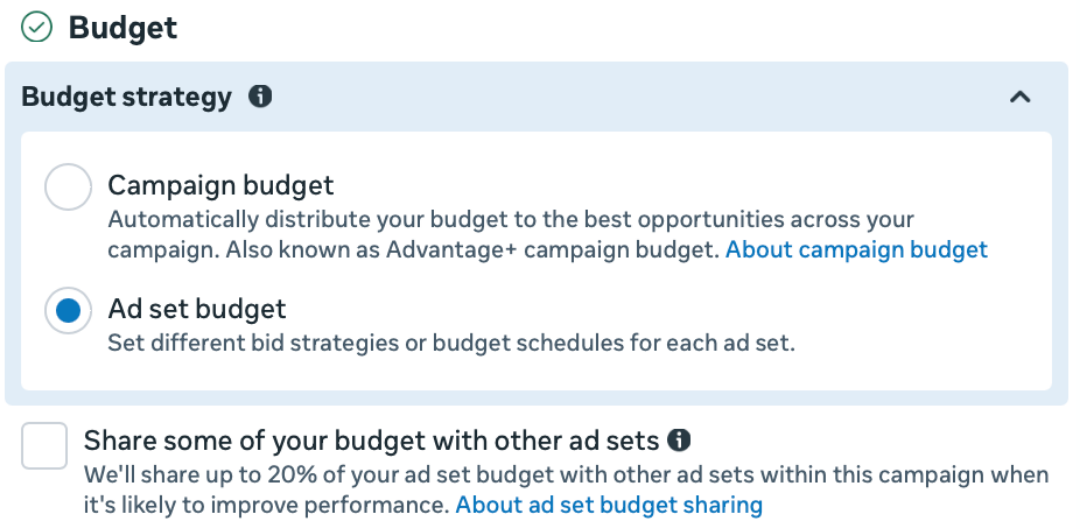
Select Ad set budget (ABO), not Campaign budget optimisation (CBO). ABO gives you tight control over spend and lets you run a retargeting ad set under the same campaign without Meta draining its budget into the cold ad set.
Ad Sets and Conversion Location
You’ll be asked where you want to generate leads: instant lead forms, your website, or a combination.
Choose instant forms only. On a small budget they convert cheaper than website conversions, they remove your landing page as a failure point, and they’re fast to fill in on mobile — which is where most of your audience will see the ad.
Connect your Facebook page from the drop-down, and your Instagram if you have one (if not, it defaults to Facebook only).
Audience
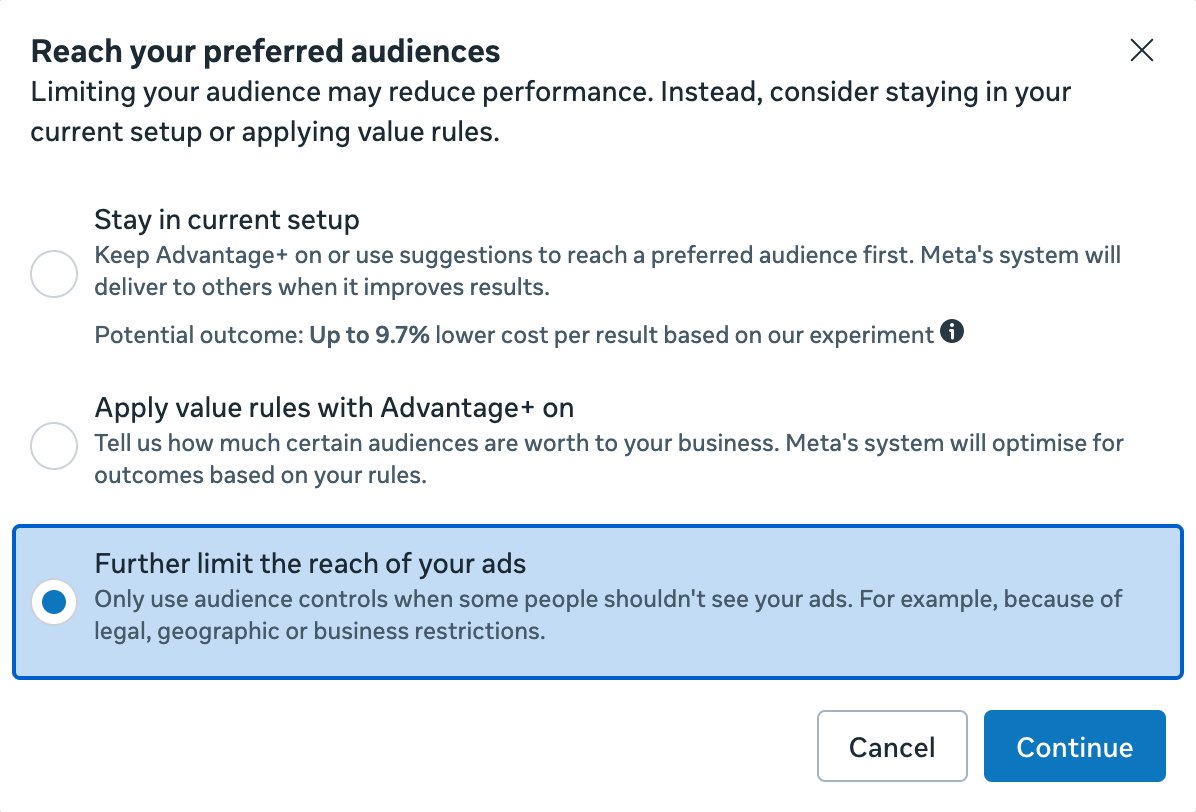
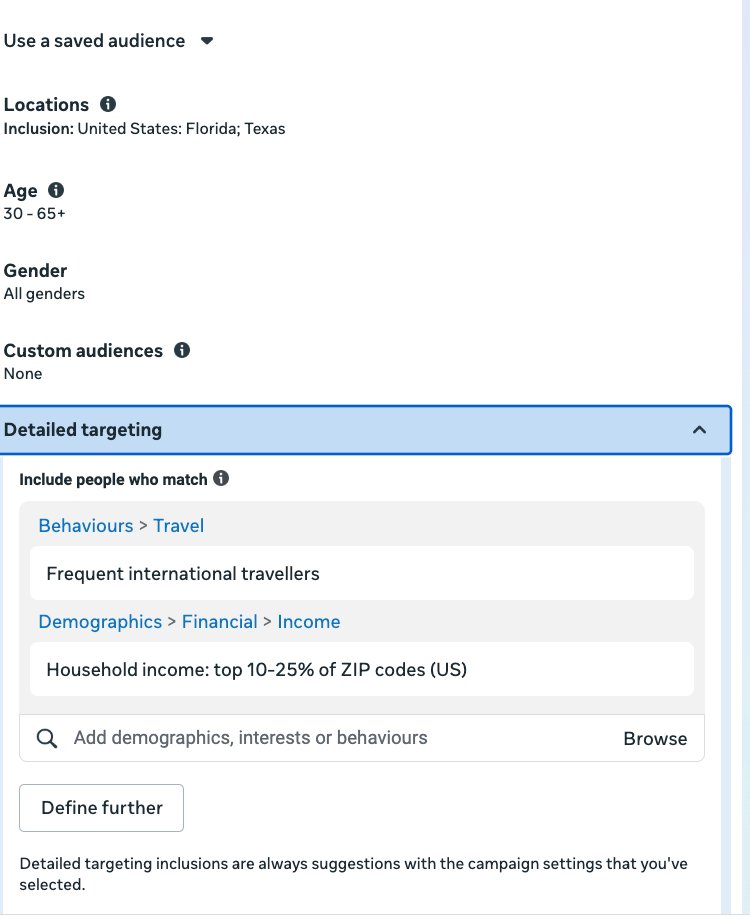
Locations: rather than targeting the whole country, focus your budget on the one or two states you know have a higher travel rate — Florida and Texas are reliable defaults. Otherwise $28/day is spread far too thin. If you have historic data, target the states that have already converted best for you.
You’ll see the suggestion “Reach more people likely to respond to your ads (We’ll also show ads to people interested in your selected cities and regions, in those countries)” — untick this box.
Demographics
This depends on your knowledge of your ideal customer, but as a strong default for higher conversion rates:
- Age: 30–65+
- Genders: All
- Behaviours → Travel: Frequent international travellers
- Demographics → Financial → Income: Household income: top 10–25% of ZIP codes (US)
The Lead Form
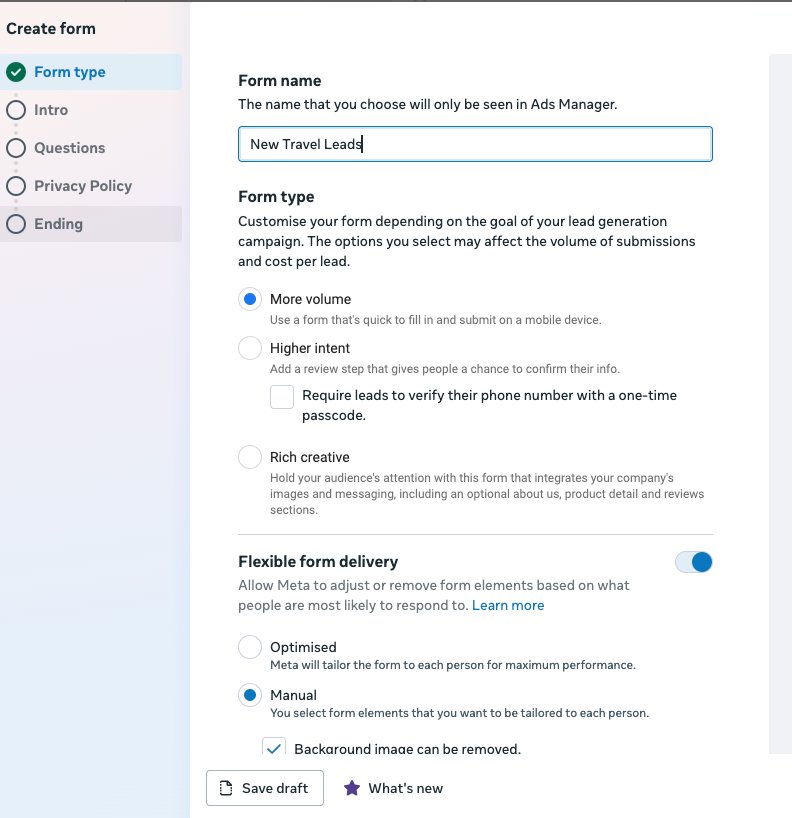
Create a short form — multiple choice works well, or keep it simple: Name, Phone, Email, Message. For form type, choose More volume (quick to fill in and submit on mobile). Under Flexible form delivery, select Manual, not Optimised — you don’t want Meta editing your form.
You can also connect WhatsApp or Messenger so the potential customer can reach you after submission.
All lead form submissions land in your Lead Centre (Meta Business Suite). You can connect Google Sheets for free to capture them there instead. What we do for clients is connect Zapier — leads post straight into the client’s email or CRM with automatic follow-ups, because lead value decays fast: respond within minutes, not hours.
Quality filters: tick “Require SMS verification to submit form”. The user has to verify their phone number with a one-time passcode before submitting. As well as cutting general spam, it filters out tyre-kickers — it adds a small but real layer of intent at the earliest stage.
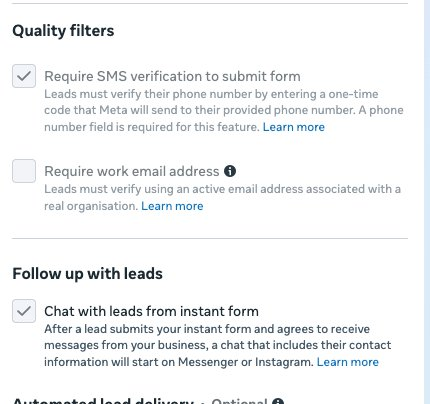
Chat with leads from instant form — tick this too. After a lead submits your form and agrees to receive messages, a chat including their contact information opens on Messenger or Instagram.
Ad Set 1 — Cold Traffic ($28/day, 85% of budget)
Ad set 1 is your cold traffic — people seeing your brand for the first time. The targeting above puts you in front of the right ones. Set the budget at $28/day (85% of total).
You only need 1 ad in this ad set. With Meta’s 2026 flexible media, you can load up to 10 images and videos into a single ad — a mix of media. You don’t need all 10; if you have 2 or 3 strong assets, use those and proceed.
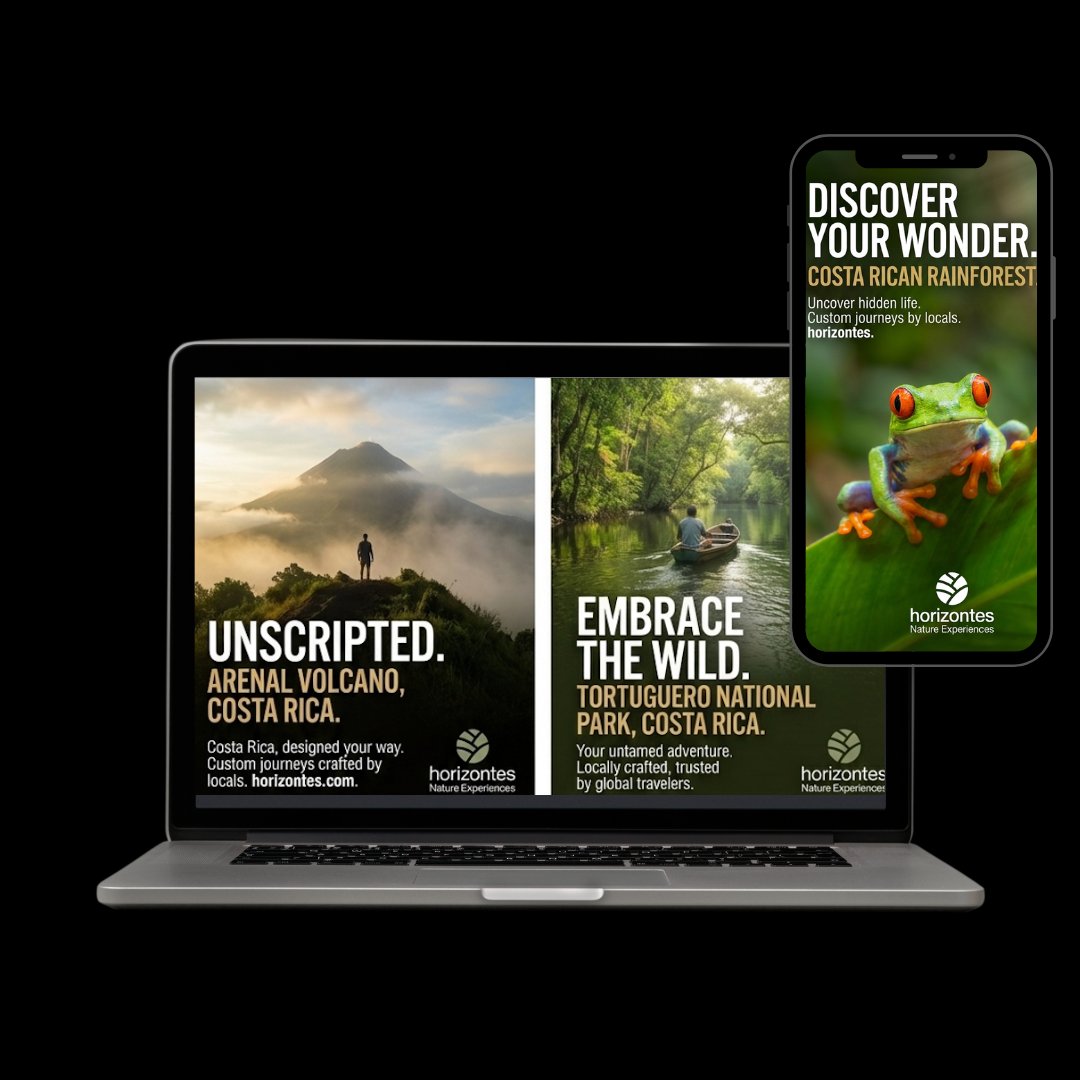
You definitely need at least 1 video under 30 seconds with subtitles — they work especially well for travel. A review from someone who’s experienced your offer, or a POV video of the experience itself, both perform. For statics, a scroll-stopping hook over strong destination imagery is what stands out. Here are examples we ran for a Costa Rica nature travel client:
Primary text: give yourself 3 different hooks plus your USPs, and let the algorithm rotate them.
Ad Set 2 — Retargeting ($5/day, 15% of budget)
Ad set 2 is your warm traffic. It’s a wasted opportunity not to retarget people who have already visited your website or engaged with your profiles — they’re the cheapest conversions you’ll get.
Use the two custom audiences you built earlier: website visitors (30 days) stacked with Facebook/Instagram engagers (90 days). The stack matters on a small budget: if your site gets under roughly 2,000–3,000 visitors a month, the website audience alone is too thin and Meta will struggle to deliver — the engagement audience gives it room to work.
$5/day (15% of total) is enough. Watch for a frequency of around 3–5 — the average number of times each person sees your ad over the campaign.
Tweak the hook here: the best retargeting hooks re-engage instantly through expertise, social proof, or urgency — they’re talking to someone who already knows you exist.
Placements
Meta lets you run ads across five platforms in its family of apps:
- Facebook — the all-in-one platform; groups, marketplace, feed
- Instagram — visual-first: posts, video, stories, reels
- Messenger — ads in the Chats tab and between stories
- Audience Network — third-party apps and mobile sites; your ad shows up inside games, news articles, random apps
- Threads — Meta’s text-focused app
They all share the same ads system, and Meta makes money on all of them. Be ruthless: untick everything and select only Facebook and Instagram for the cold ad set. Audience Network is poor quality and Threads doesn’t convert in this niche — don’t spend precious budget there.
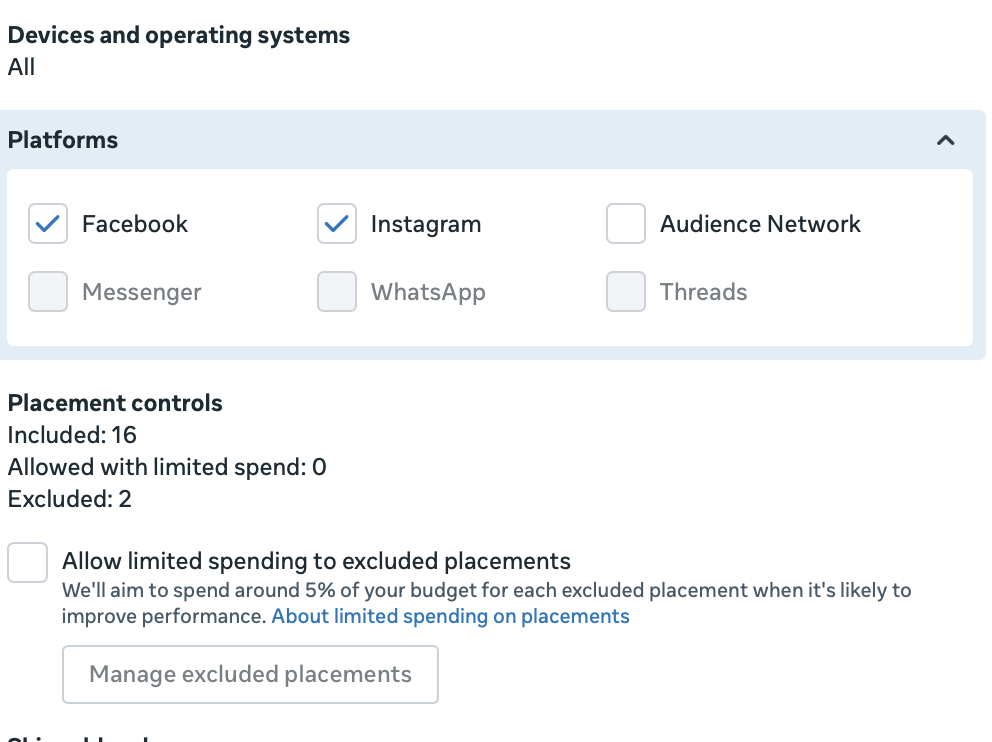
For the retargeting ad set, you can allow all placements — warm reach is cheap, and the audience already knows you.
What to Expect in Month 1
The campaign will enter the learning phase for around a week — this is normal. Don’t expect much for the first 5 days; results kick in once the algorithm works out who converts.
Don’t restructure anything in month 1. No budget changes, no audience edits, no pausing ads because day 3 looked quiet. Every edit resets learning. The one exception: in week one, check delivery is active and test-submit your own lead form to confirm leads are landing where you expect. A broken form running untouched for 30 days is the most common DIY failure I see.
With this setup, expect $10–$20 per qualified lead for day tours and standard experiences. For premium multi-day itineraries, expect higher — the lead is worth proportionally more, so the economics still work.
Frequently asked questions
Is $1,000 a month enough for Facebook Ads?
Yes — for travel brands, $1,000/month ($33/day) is enough to generate qualified leads, provided the budget is concentrated: one campaign, tight geographic targeting, instant lead forms, and Facebook/Instagram placements only. Spreading the same budget across multiple campaigns or a whole country is where small budgets fail.
Should I use ABO or CBO on a small budget?
Ad set budget (ABO). It gives you fixed control over how much goes to cold traffic versus retargeting. CBO will pour nearly everything into the cold ad set and starve your retargeting — which is your cheapest source of conversions.
Should travel brands use lead forms or website conversions?
On a small budget, instant lead forms. They cost less per lead than website conversions, remove your landing page as a point of failure, and submit faster on mobile. Add SMS verification to filter out low-intent submissions.
What’s a good cost per lead for travel on Facebook?
$10–$20 per qualified lead is a realistic benchmark for day tours and experiences using this setup. Premium multi-day trips typically cost more per lead, but the higher booking value more than compensates.
What if my budget is smaller or bigger than $1,000?
The setup doesn’t change — only the daily numbers do. The same one-campaign, two-ad-set structure works from around $500/month up to several thousand; you simply scale the cold and retargeting split (we use $28 and $5 a day at $1,000). Below roughly $500/month, put everything into a single cold ad set until you’ve built a retargeting audience.
Want this set up and managed for you?
That’s the full setup — and most of the budget waste we see comes from just two or three of these settings being missed. We build and run this exact structure for travel brands.
Get in touch →